
01 · Sent
14:02. Order #48213 leaves checkout.
One message with a JSON body, headed for the orders queue. Nothing unusual. Yet.
Fumiq is a native desktop app for browsing queues and subscriptions, peeking and sending messages, and clearing dead-letters in seconds. RabbitMQ support is coming soon.
Free 30-day trial · All features included · No credit card
A short film in five scrolls
Order #48213. From checkout, to the dead-letter queue at 3 AM, and back.
01 · Sent
One message with a JSON body, headed for the orders queue. Nothing unusual. Yet.
02 · Queued
Thousands of orders, all waiting for a consumer. From the outside, ours looks like every other one.
03 · Failed
The consumer rejects it. Again, and again. After the last delivery attempt, Service Bus gives up and moves it to the dead-letter queue.
04 · The old way
The Azure Portal makes you click through blade after blade to peek one message. ServiceBusExplorer only runs on Windows. The CLI hands you a raw text dump.
05 · Fumiq
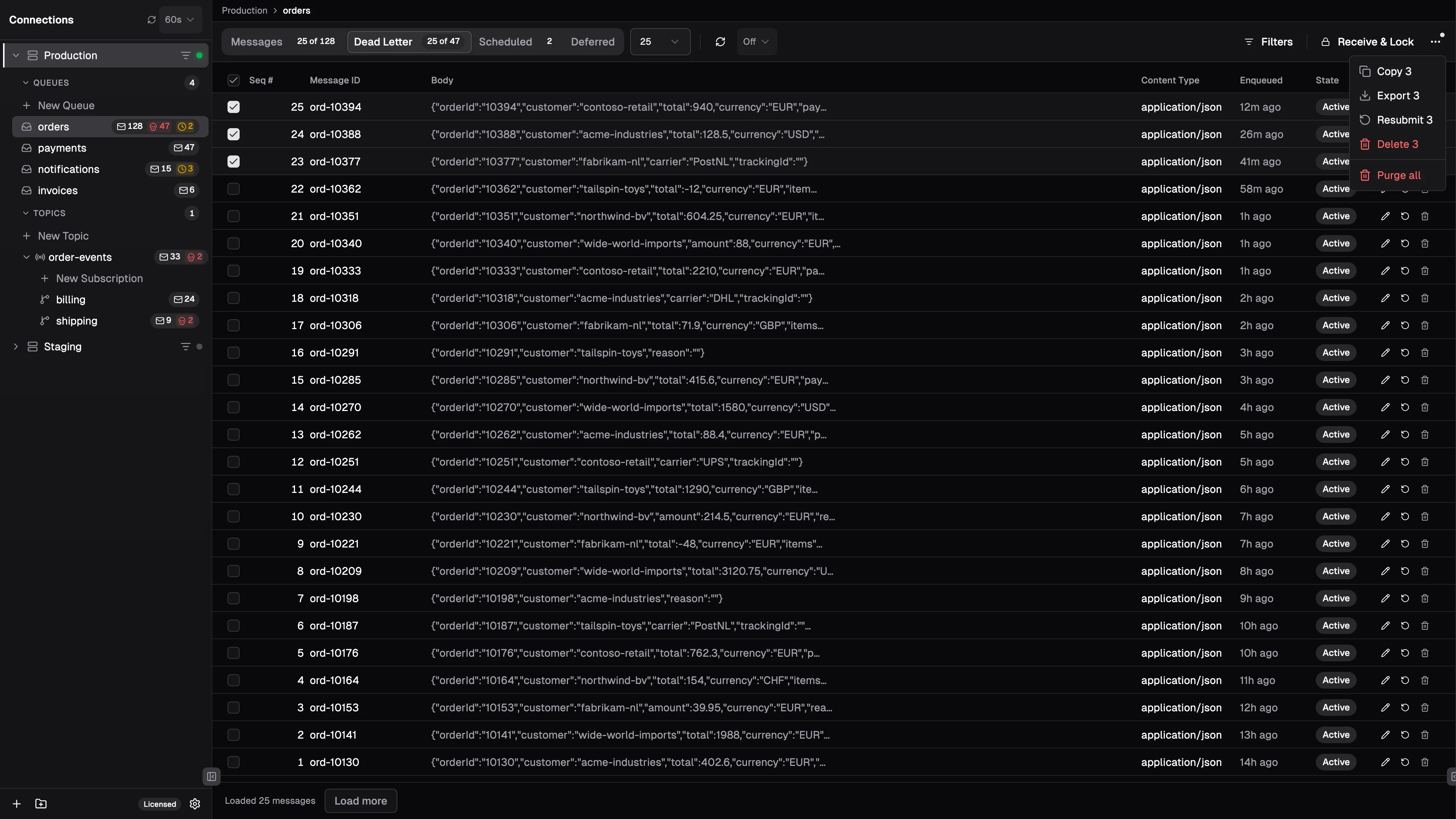
Open the Dead Letter tab, read the body as a proper tree, correct it and send it back to orders. It completes this time.
What you get
Browse every queue, topic, and subscription, and peek messages the moment you click.
Sift through what dead-lettered, then resubmit the messages that deserve another run.
Read a message properly: the body as a syntax-highlighted tree, and every property beside it.
Fill a queue with realistic test data from one template, hundreds of messages at a time.
Reach any action, or any entity in the namespace, without leaving the keyboard.
Features
An Azure Service Bus explorer that is native, fast, and honest about what is in your queues.
Native AMQP protocol via Rust. No REST API overhead, no SDK abstraction layers. Peek thousands of messages in seconds.
Connect with Azure AD and RBAC, not just connection strings. Use your existing identity and role-based access to securely browse namespaces.
Copy messages between queues, export to JSON files, or import messages from disk. Move data across environments in seconds.
Filter messages by content, properties, or metadata with a visual query builder. Combine multiple conditions to quickly find the messages you need.
Add columns for application properties or extract values from JSON bodies using JSONPath. Resize, reorder, and persist layouts per entity.
Select multiple messages with checkboxes or Shift+click ranges. Bulk delete, dead-letter, resubmit, or cancel scheduled messages in one action.
Brokers
Every broker usually means another UI. Fumiq is heading the other way.
Available
Queues, topics, subscriptions, sessions, rules and dead-letters.
Coming soon
The same explorer, for your RabbitMQ brokers.
On the horizon
Planned, not promised.
Pricing
One-time payment, includes a year of updates. The app keeps working after that.
€49
One-time payment · excl. VAT
€199
One-time payment · excl. VAT
Volume pricing
Tailored to your team
Secure payment via Polar · License key delivered by email · Your version keeps working forever, renewing after year one is optional
FAQ
You get 30 days with every feature included, no credit card required. When the trial ends, buy a license and pick up right where you left off.
Your app keeps working, forever. A license is a one-time purchase that never expires; the year of updates only determines which new versions you can install. Renew whenever you want another year of updates.
After checkout, your license key arrives by email. Paste it into Fumiq and you're done. You can deactivate a machine at any time to move your license to another one.
One seat is one developer. Personal includes a single seat, Team includes five, and Enterprise has no limit. Need a different size? Email hello@fumiq.app.
Prices are shown excluding VAT. Checkout is handled by Polar, our merchant of record, which calculates the correct VAT or sales tax for your country and sends you an invoice by email.
Locally on your machine, and nowhere else. Fumiq talks to Azure Service Bus directly from your desktop; your connection strings and messages never pass through our servers.
Yes. Every purchase comes with a 30-day money-back guarantee. Request a refund through your Polar order link or email hello@fumiq.app and we'll take care of it.
The Azure Portal requires clicking through multiple blades and loading spinners to peek at a single message. Fumiq connects directly via AMQP, giving you instant access to all your queues, topics, and subscriptions in a native desktop app. Compare Fumiq and the portal.
Yes. Fumiq is a native desktop app built with Rust and Tauri that runs on macOS, Windows, and Linux. The open-source ServiceBusExplorer is a capable tool, but it is a Windows-only .NET Framework app, so on a Mac or Linux machine you need a Windows VM to run it. Read the full comparison.
QueueExplorer is a mature tool that also covers RabbitMQ, MSMQ and ActiveMQ, and it now runs on Windows, macOS and Linux. Its licenses start at $149 per computer, and custom columns need the $249 Professional edition. Fumiq focuses on Azure Service Bus, starts at €49 one-time, and includes JSONPath custom columns and a command palette in every license. Read the full comparison.
Fumiq is a one-time purchase. The Personal license is €49 and the Team license (5 seats) is €199. Both include 1 year of updates. A free trial with full features is available.
Free 30-day trial · Buy a license · 30-day money-back guarantee · License key delivered by email